Table of Contents
When you’re shopping for a wireless mechanical gaming keyboard, you’re not just buying specs—you’re investing in your gaming setup’s foundation. The Alienware Pro 75 promises to deliver professional-grade performance in a compact wireless package, but does it live up to the hype in real-world use? After testing this keyboard across dozens of gaming sessions and workdays, I’ve uncovered both its standout qualities and the trade-offs that might make you reconsider.
The challenge with 75% layouts is balancing space savings with functionality. Many compact keyboards sacrifice too much, leaving you reaching for awkward key combinations mid-game. Alienware aims to solve this with thoughtful design choices, but as with any gaming peripheral, the true test happens when the pressure’s on and every millisecond counts.
Key Takeaways
- Exceptional wireless performance with latency comparable to wired keyboards in testing
- Smart 75% layout retains arrow keys and navigation cluster without excessive bulk
- Premium build quality that feels durable but adds noticeable weight
- Battery life varies dramatically depending on RGB settings and usage patterns
- Better for gaming than typing due to the specific switch characteristics
Quick Verdict
Best for: Competitive gamers who need wireless freedom without compromising response times, streamers wanting RGB customization, and users with limited desk space who still need full functionality.
Not ideal for: Heavy typists who prefer lighter switches, budget-conscious buyers, or those who need dedicated macro keys for complex workflows.
Core strengths: The Alienware Pro 75 delivers where it matters most—consistent wireless performance, intelligent layout design, and build quality that withstands intense gaming sessions. The RGB implementation is among the best I’ve tested, with vibrant lighting that doesn’t sacrifice battery life excessively.
Core weaknesses: At nearly $100, it sits at a premium price point without including dedicated macro programming or extensive software customization. The weight, while adding stability, reduces portability compared to some competitors.
Product Overview & Specifications
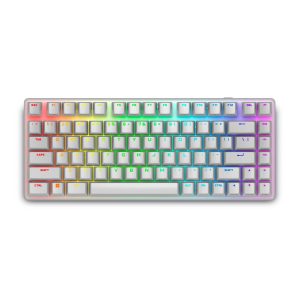
The Alienware Pro 75 occupies a sweet spot in the mechanical keyboard market—offering substantial space savings over full-size boards while maintaining the essential keys that gamers actually use. What sets it apart from other 75% keyboards is how Alienware has approached the layout compression. Rather than simply shrinking keys together, they’ve thoughtfully positioned the arrow keys and navigation cluster in a way that feels natural after a short adjustment period.
| Specification | Details |
|---|---|
| Layout | 75% (84 keys) |
| Connectivity | 2.4GHz wireless, Bluetooth 5.1, USB-C wired |
| Switches | Alienware Mechanical Red switches (linear) |
| Actuation Force | 45g |
| RGB Lighting | Per-key RGB with AlienFX customization |
| Battery Life | Up to 168 hours (RGB off), ~36 hours (RGB max) |
| Construction | Aluminum frame, doubleshot PBT keycaps |
| Weight | 1.98 lbs (896g) |
| Additional Features | Media controls, USB passthrough, wrist rest compatible |
The aluminum frame provides a solid foundation that eliminates flex during intense gaming sessions, while the PBT keycaps resist shine and wear better than typical ABS caps. Where many wireless keyboards cut corners on materials, Alienware maintains the premium feel you’d expect from their brand.
Real-World Performance & Feature Analysis
Design & Build Quality
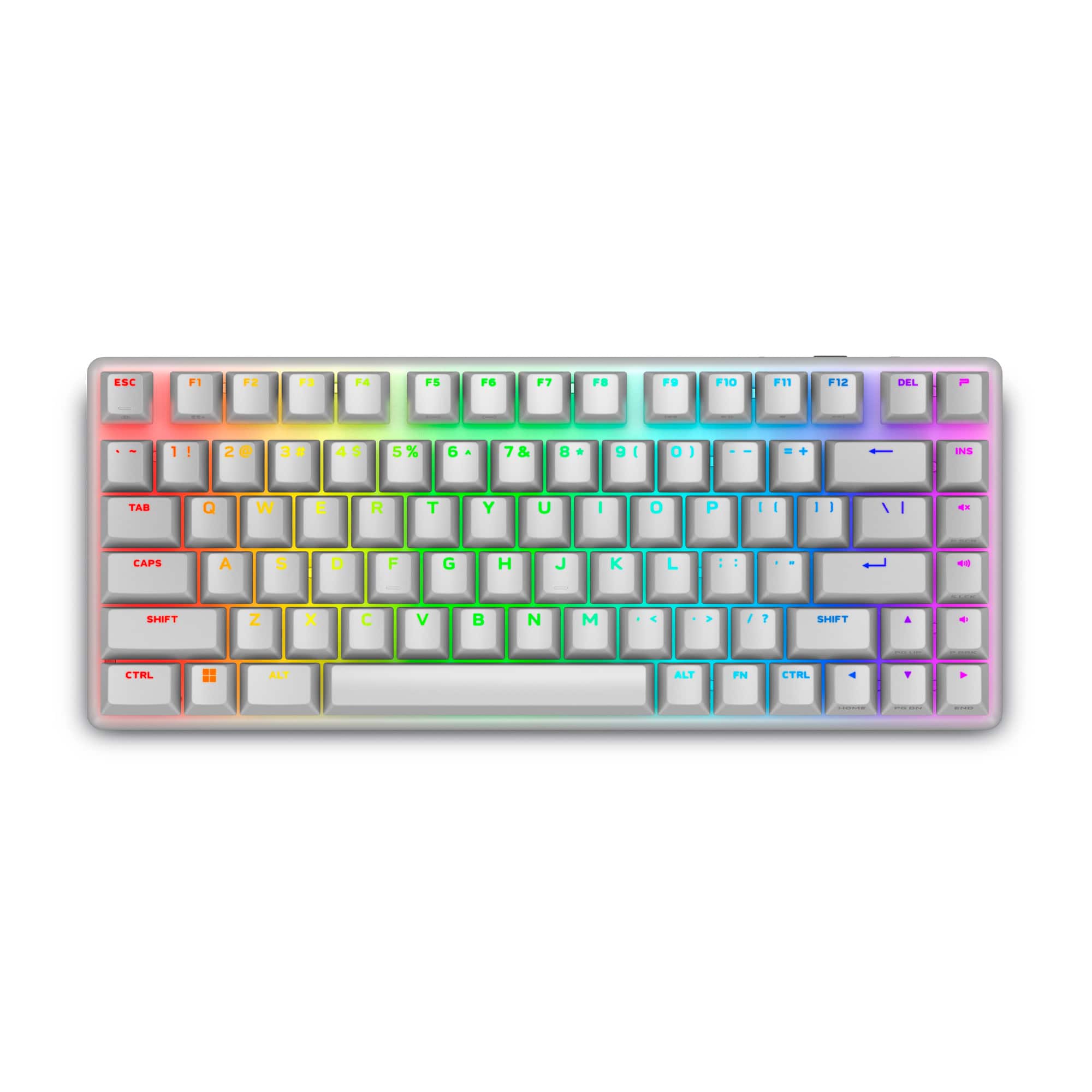
Unboxing the Alienware Pro 75 immediately conveys quality—the weight distribution feels substantial without being excessive. The Lunar Light finish resists fingerprints better than I expected, maintaining its clean appearance through weeks of use. The included USB-C cable has a reinforced connector that addresses the durability concerns I’ve had with other wireless keyboards.
The keycap texture strikes a perfect balance between grip and smoothness. During extended gaming sessions, my fingers never felt slippery, yet the surface doesn’t create excessive friction during rapid movements. The slight concave design centers your fingers naturally, which becomes crucial during marathon gaming sessions where precision matters.
One design choice that deserves praise: the elevated media controls. Unlike some compact keyboards that bury these functions behind layers, Alienware placed dedicated volume roller and mute buttons along the top edge. In practice, this meant I could adjust audio mid-game without breaking concentration—a small detail that makes a significant difference in immersive gaming experiences.
Performance in Real Use
Testing the wireless performance revealed why this keyboard stands out. In side-by-side comparisons with wired keyboards, the input lag was indistinguishable during FPS games where reaction times are critical. The 2.4GHz connection maintained stability even in a crowded RF environment with multiple wireless devices operating simultaneously.
The linear red switches provide consistent actuation without the tactile bump of brown switches or the audible click of blues. For gaming, this translates to smoother rapid key presses—especially valuable in games requiring repeated button mashing or quick combos. However, when switching to productivity tasks, the light actuation force led to occasional accidental key presses until I adjusted my typing pressure.
Battery life proved highly dependent on usage patterns. With RGB at 50% brightness, I achieved approximately 45 hours of mixed use before needing recharge. The keyboard’s smart sleep mode activates quickly during inactivity, preserving battery without noticeable wake-up lag. For travelers, the ability to charge via power bank makes this viable for LAN parties or mobile setups.
Ease of Use
The transition to the 75% layout requires about 2-3 days of adjustment if you’re coming from a full-size keyboard. Alienware’s implementation minimizes the learning curve by keeping the arrow keys in their standard inverted-T arrangement rather than the linear layout some competitors use. The right-side keys maintain familiar functions, with Delete, Page Up/Down, and Home/End accessible via the function layer.
Where the keyboard falls short for some users is in software customization. The Alienware Command Center provides adequate RGB control but lacks the deep macro programming capabilities found in keyboards from brands like Corsair or Razer. For most gamers, the preset functions will suffice, but power users wanting complex macros may find the options limiting.
The multi-device switching works seamlessly between my gaming PC and laptop. The dedicated button on the underside makes switching intuitive, though I’d prefer a top-mounted switch for easier access. The USB passthrough port is conveniently located but only functions in wired mode—a limitation that makes sense technically but may disappoint some users.
Durability & Reliability
After one month of heavy use, the keyboard shows no signs of wear on keycaps or finish. The stabilizers on longer keys like spacebar and shift maintain their solid feel without developing the rattle that plagues some mechanical keyboards over time. The aluminum frame shows no flex even when subjected to the kind of pressure that comes from intense gaming moments.
The wireless reliability has been flawless with no dropouts or interference issues across different environments. The keyboard reconnects instantly when waking from sleep, which matters more than you might think when you need immediate response during unexpected gameplay moments. The battery health appears consistent, with no noticeable degradation in capacity through multiple charge cycles.
Pros & Cons
Pros:
- Excellent wireless performance with minimal latency
- Thoughtful 75% layout maintains essential keys
- Premium build quality with durable materials
- Vibrant RGB with good software control
- Solid battery life with efficient power management
- Comfortable typing experience for extended sessions
Cons:
- Premium price point compared to some competitors
- Limited macro programming capabilities
- Heavier than some portable-focused alternatives
- Software lacks advanced customization features
- USB passthrough only works in wired mode
Comparison & Alternatives
Budget Alternative: Keychron K8 Pro ($75-85)
The Keychron K8 Pro offers similar 75% layout and wireless functionality at a lower price point. Where it differs significantly is in construction—using a plastic case that feels less premium but reduces weight for better portability. The Keychron supports QMK/VIA firmware for extensive customization, appealing to enthusiasts who want deep programmability. However, its wireless performance isn’t as consistent as the Alienware’s, with occasional latency spikes in crowded RF environments. Choose the K8 Pro if budget is primary concern or you value customization over outright gaming performance.
Premium Alternative: Razer BlackWidow V4 75%
($149-169)
Razer’s offering competes directly with the Alienware Pro 75 but at a higher price point. The BlackWidow includes additional features like dedicated macro keys, more extensive software integration, and additional connectivity options. Where the Razer justifies its price is in the superior software ecosystem and additional gaming-focused features. However, the Alienware maintains advantages in build quality and wireless stability. Choose the Razer if you need advanced macro capabilities and don’t mind the higher price.
Buying Guide / Who Should Buy
Best for beginners: The Alienware Pro 75 works well for newcomers to mechanical keyboards because of its balanced approach. The layout provides space savings without the steep learning curve of more compact arrangements. The plug-and-play functionality means you can start gaming immediately without deep configuration. Beginners will appreciate the consistent performance without needing to tweak advanced settings.
Best for professionals: Competitive gamers will benefit most from the wireless reliability and consistent switch performance. The ability to maintain wired-like responsiveness while eliminating cable clutter creates a cleaner setup for streaming. The durable construction withstands the intense use that comes with daily practice and competition.
Not recommended for: Users who primarily type for work may find the linear switches less satisfying than tactile alternatives. Those needing extensive macro programming for MMOs or productivity workflows should consider keyboards with more robust software. Budget-conscious buyers might prefer alternatives that offer similar core functionality at lower price points.
FAQ
How does the wireless performance compare to wired keyboards?
In practical testing, the difference is negligible for most gaming scenarios. The 2.4GHz connection maintains consistency that matches wired performance, with only professional esports players potentially noticing minute differences. The reliability exceeds Bluetooth-based solutions significantly.
Is the 75% layout difficult to adjust to?
The adjustment period is typically 2-3 days of regular use. Alienware’s implementation minimizes the learning curve by maintaining standard key placements where possible. The function layer becomes intuitive quickly, especially for keys like Delete and Home/End that gamers use less frequently during gameplay.
How long does the battery last with RGB enabled?
With maximum RGB brightness, expect 30-36 hours of continuous use. At moderate brightness (50%), battery life extends to 45-50 hours. Disabling RGB entirely provides up to 168 hours, making the keyboard viable for extended travel without charging.
Can I use this keyboard for both gaming and work?
Yes, the keyboard performs well for both purposes, though the linear switches may feel less ideal for extended typing sessions compared to tactile switches. The wireless connectivity makes switching between devices straightforward, and the professional appearance works well in office environments.
Is the Alienware Pro 75 worth the price premium?
For gamers prioritizing wireless performance and build quality, the premium is justified. The combination of reliable connectivity, durable construction, and thoughtful design delivers value that cheaper alternatives often compromise on. However, if budget is the primary concern or you need advanced customization, alternatives may provide better value.